
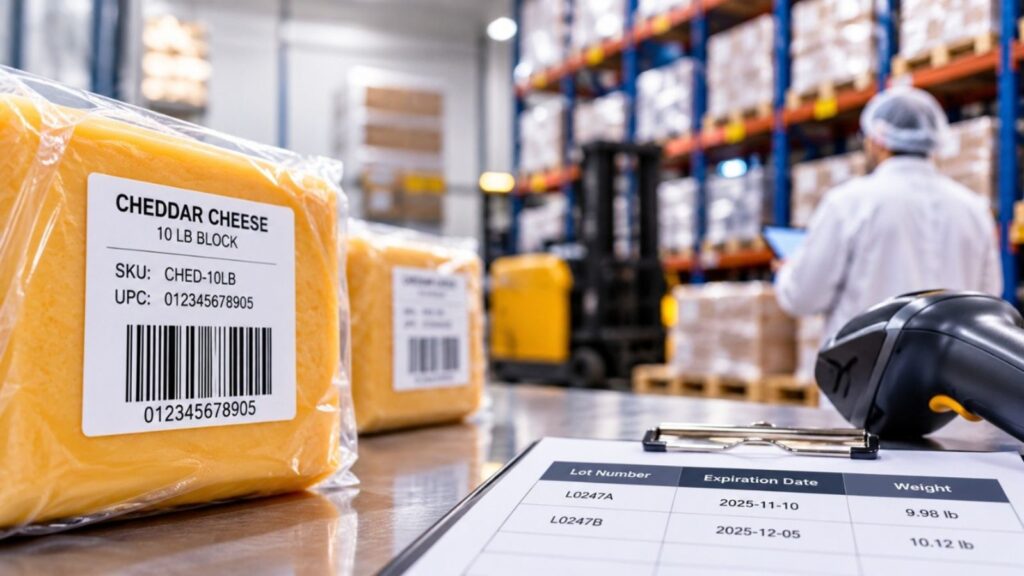
Walk through a food manufacturing or distribution operation, and you’ll see product codes everywhere.
SKUs identify products inside the business. UPCs appear on packaging and cases. Barcodes help warehouse teams receive, move, pick, and ship inventory.
That part is straightforward.
Now take two cases of the same product sitting next to each other in the warehouse. They may have the same SKU and the same UPC, but they aren’t necessarily the same inventory.
They could come from different production lots. One might expire weeks before the other. Whether it’s cheese, meat, or seafood, the actual weights may differ too.
That difference becomes important when there’s a quality issue or recall. A SKU or UPC can tell you what the product is. It won’t tell you which lot is affected, how much of that lot you still have, where it is, or which customers received it.
UPCs and SKUs help identify products. Lot numbers, expiration dates, weights, and transaction history help you understand the inventory behind those products.
And when you’re dealing with perishable food, you need both.
What Is a UPC?
What Is a SKU?
UPC vs. SKU: What’s the Difference?
UPC vs. SKU vs. Lot Number
Why Food Companies Need More Than SKUs and UPCs
How Barcodes Support Food Traceability
How UPCs, SKUs, and Lot Numbers Work in a Food ERP
From Receiving to Recall: What Traceability Looks Like
Frequently Asked Questions About UPCs and SKUs
Product Identification Is Only Part of the Picture
A UPC, or Universal Product Code, identifies a specific product as it moves through the supply chain.
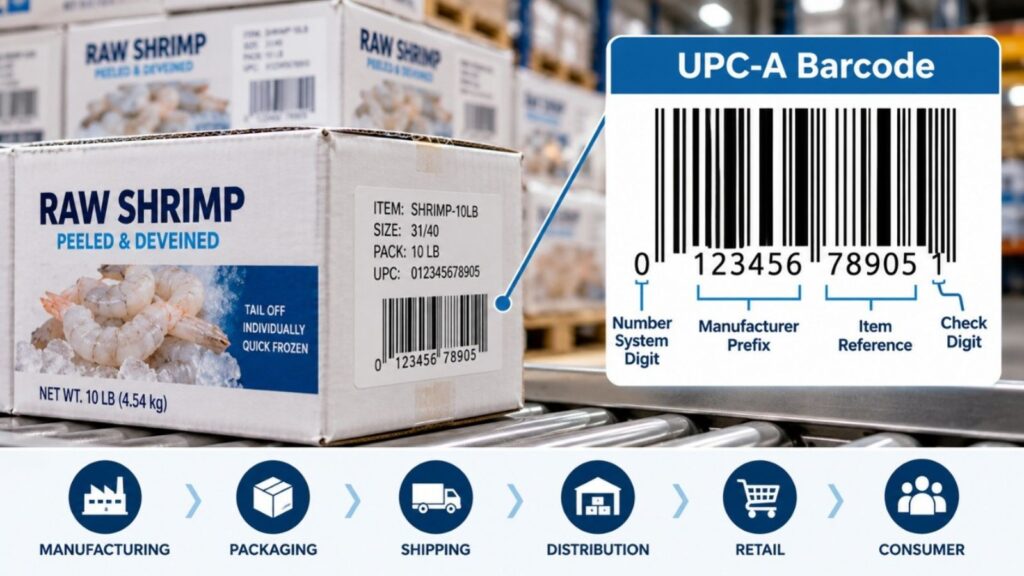
Most people recognize the UPC as the barcode printed on a product or case. Technically, the number that identifies the product differs from the barcode that carries it. In the U.S. and Canada, the familiar UPC-A barcode typically carries a 12-digit GTIN (Global Trade Item Number).
For a food company, the important point is that the UPC provides a standardized way to identify a trade item. For example, a case of frozen shrimp can be identified consistently when it is sold, received, scanned, or shipped between trading partners.
But the UPC identifies the product, not the specific inventory you have on hand.
If 200 cases of that shrimp arrive from two different production lots, the cases may carry the same UPC. The UPC identifies the product. It does not, by itself, tell you which lot a case belongs to, when it was produced, when it expires, or where that inventory has been.
Tracking those details requires more than a UPC. It requires lot information and inventory records that follow the product through the operation.
A SKU, or Stock Keeping Unit, is an internal code a business uses to identify and manage a product in its inventory.
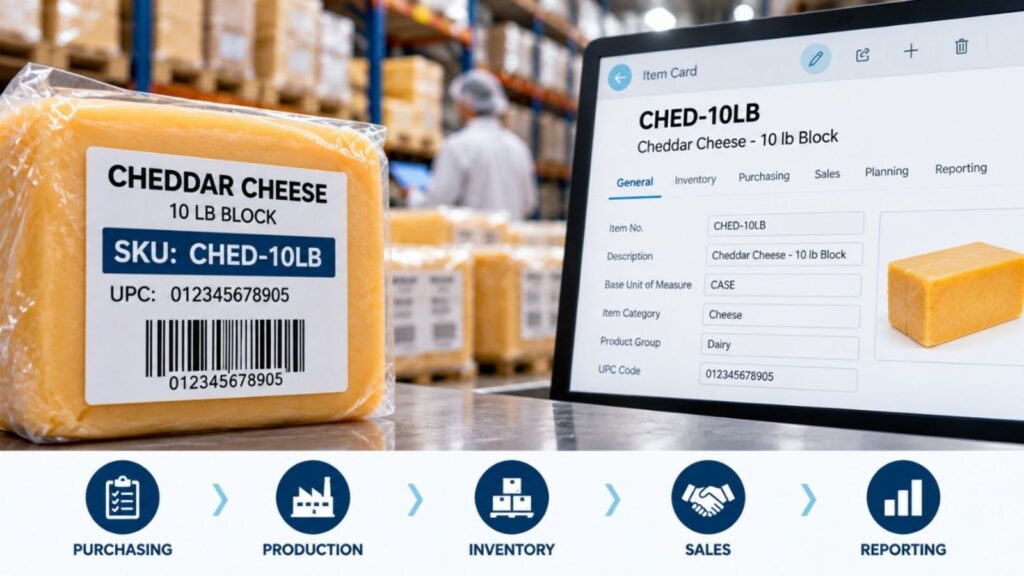
Unlike a UPC, a SKU is created by the company. There is no universal format, and two companies can use completely different SKUs for the same product.
A food manufacturer might use a SKU such as CHED-10LB for a 10-pound block of cheddar cheese. That SKU can follow the item through purchasing, production, inventory, sales, and reporting. Another company selling the same cheese may use an entirely different SKU.
This flexibility is useful because SKUs can reflect how a business organizes its products. Different pack sizes, flavors, grades, or units of measure may each have their own SKU.
But a SKU still identifies the item, not a specific production lot.
If there are 300 cases of CHED-10LB in the warehouse, they may all share the same SKU even though they were produced on different days and have different lot numbers and expiration dates.
That distinction matters in food. The SKU tells you what you have. Lot and inventory data tell you which inventory you have.
The simplest way to think about UPCs and SKUs is that they identify products for different purposes.
A UPC is a standardized identifier designed to identify a product across companies and trading partners. A SKU is an internal identifier a business creates to manage that product within its own operation.
The same product can have both.
| SKU | UPC | |
| Used for | Internal product identification | Standardized product identification |
| Created by | Your business | Assigned using GS1 standards |
| Standardized | No | Yes |
| Can vary by company | Yes | No, for the same trade item |
| Used in inventory systems | Yes | Yes |
| Commonly scanned at retail | Sometimes | Yes |
| Identifies a production lot | No | No |
| Tracks expiration dates | No | No |
Consider a food distributor carrying a 10-pound case of cheddar cheese. The distributor might assign its own SKU to manage that item internally, while the case also carries a UPC used to identify the product outside the company.
Both codes can point to the same product. Neither tells you which production lot that particular case came from or when it expires.
A UPC and SKU tell you what the product is. A lot number tells you something different: which specific group of inventory it came from.
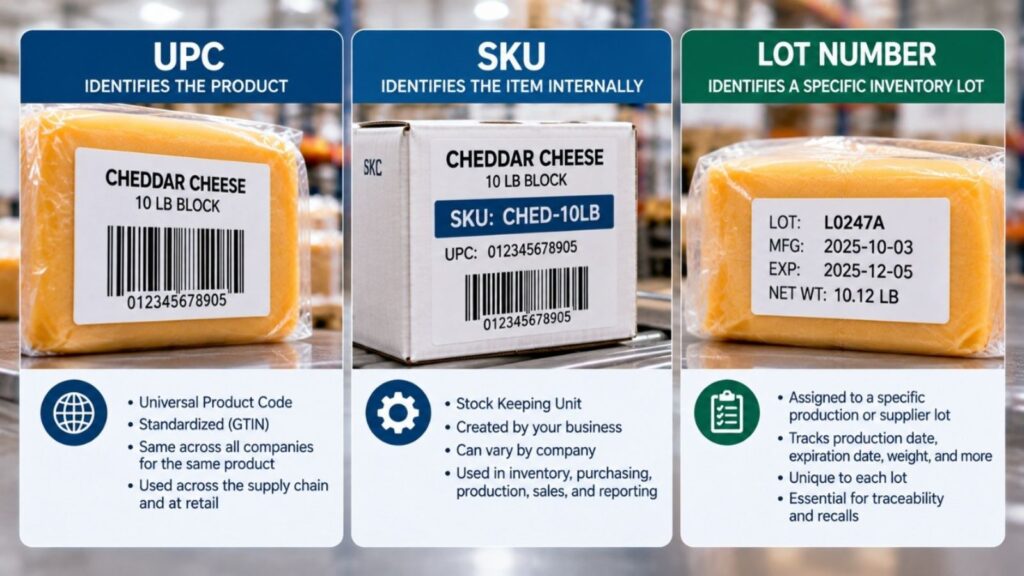
Consider a food distributor with 500 cases of the same cheese in the warehouse. All 500 cases may have the same SKU and UPC, but they may not have been produced at the same time.
Two hundred cases could belong to one production lot and expire in November. The remaining 300 could belong to another lot and expire in December.
On an inventory report, you still have 500 cases of the same item. On the warehouse floor, however, those lots need to remain distinguishable.
That matters when deciding which inventory to ship first. It matters when a customer requires a specific remaining shelf life. And it becomes critical when a quality issue affects one lot but not the other.
The lot number is what separates those 200 cases from the other 300. It lets the business manage the same SKU differently based on when it was produced or received, how much shelf life remains, and whether a specific lot is affected by a quality issue.
That’s the difference between knowing how much inventory you have and knowing exactly which inventory you have.
Once you know the SKU, UPC, and lot number, you have a much clearer picture of the inventory. In food, you usually have more to manage.
Take that same case of cheese. The lot number tells you which production run it came from, but the warehouse may also need to know how much shelf life remains, what the case actually weighs, and where it is stored.
Those details affect what happens next.
An expiration date can determine which lot gets picked first. A customer may require a minimum number of days of shelf life remaining when the product arrives. A variable-weight case may be stocked as one case but invoiced based on its actual weight. The warehouse needs to know exactly where that inventory is before it can follow any of those rules.
The information also needs to stay with the product as it moves. If raw material is used in production, the business needs a record of what went into the finished product. When finished goods ship, the business needs to know which lots went to which customers.
A SKU or UPC alone cannot provide that history.
For a food business, inventory is not just an item and a quantity. It has a lot, a shelf life, a location, and sometimes an actual weight. Keeping those details connected makes inventory usable and traceable.
A UPC barcode can identify the product. In a food operation, the warehouse often needs more.
A case arriving at receiving may have a product number, lot number, expiration date, and, for some products, a weight or quantity. Someone has to capture that information and keep it tied to the inventory.
GS1-128 barcodes can carry multiple data elements in the same barcode, including a GTIN, lot or batch number, expiration date, and variable quantity or weight.
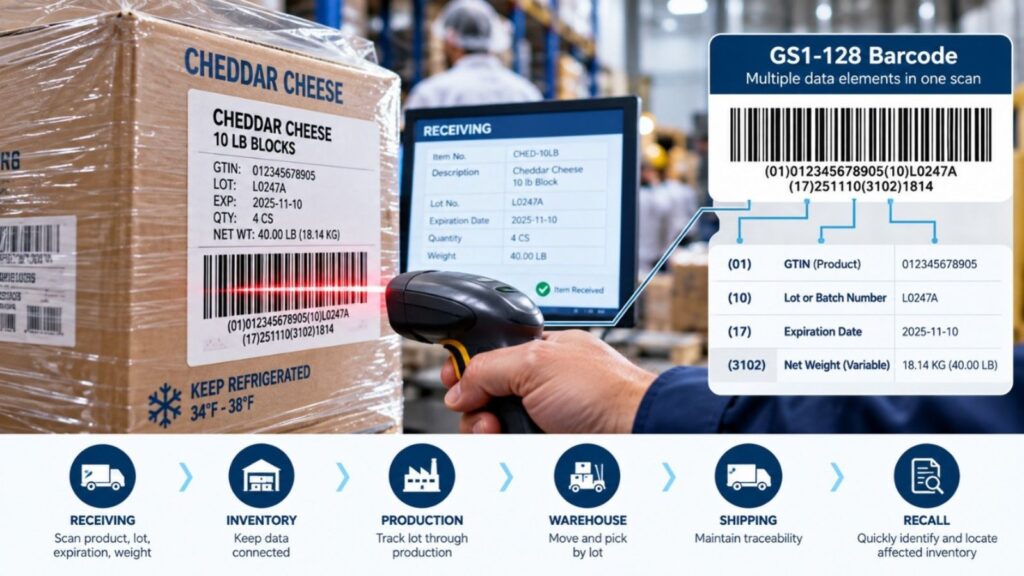
Consider a case of cheese arriving at receiving. With the right scanning and inventory setup, the receiver can scan the barcode to capture the product, along with lot and expiration information, rather than keying each value separately.
But the barcode is only carrying the data.
The inventory system still must keep that information connected as the product is received, moved, used in production, picked, and shipped.
If a lot is later put on hold or recalled, the scan that happened at receiving is only useful if the business can follow that lot through everything that happened afterward.
That’s where barcode scanning becomes part of traceability, not just data entry.
By this point, several pieces of information are tied to the same case of product.
There is the SKU your company uses to manage the item. A UPC or GTIN may be used to identify it across the supply chain. Then there is the lot number, expiration date, quantity, weight, and warehouse location.
The challenge is keeping those pieces connected as the inventory moves.
When a lot is received, the system needs to know where it was put away. If some of that inventory is used in production, the lot needs to be linked to that transaction. If the finished product moves to another location or ships to a customer, that history must remain intact.
In Microsoft Dynamics 365 Business Central, item tracking can manage lot information as inventory moves through purchasing, production, warehousing, and sales. Food companies may need additional functionality for requirements such as expiration management, catch weight, shelf-life rules, and more advanced lot control.
That becomes especially important when someone needs an answer quickly.
Which lots are still in the warehouse? Which raw material lots went into this production run? Which finished lots were produced from them? Which customers received those lots?
Those answers depend on the information staying connected from one transaction to the next.
That’s what turns inventory records into traceability.
Consider a dairy processor that receives milk, cultures, and other ingredients to produce a batch of cheese.
Each incoming ingredient may have its own supplier and lot information. When the processor receives those ingredients, that information becomes the starting point of the traceability record.
Production adds another layer.
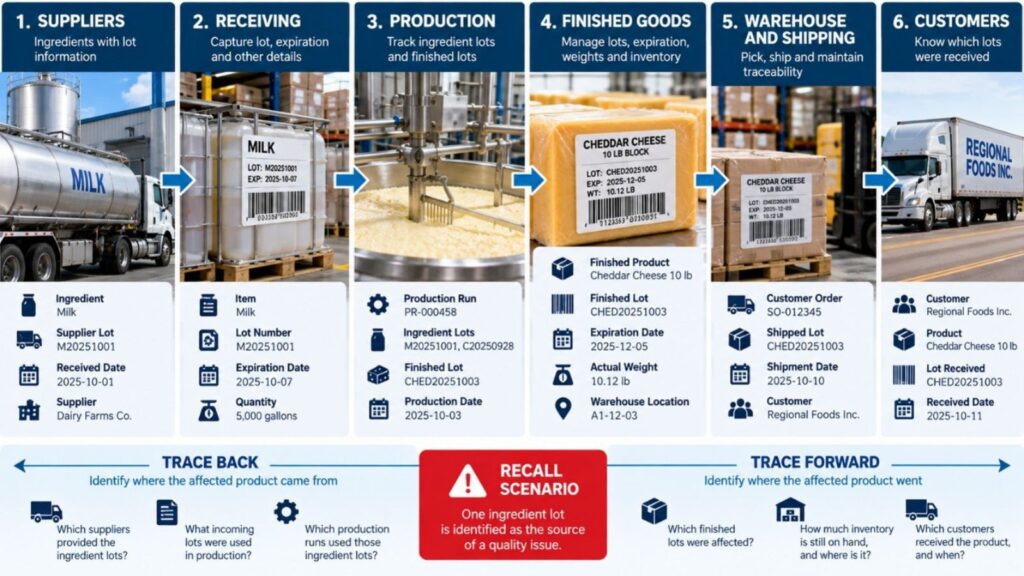
The processor needs to know which ingredient lots were consumed during a production run and which finished cheese lots resulted. Once that cheese enters inventory, the business may also manage expiration dates, actual weights, warehouse locations, and quantities available for shipment.
Then customer orders go out the door.
If a quality issue is later traced to one ingredient lot, the question is no longer simply, “How much of this SKU do we have?”
The business needs to know which production runs used that ingredient, which finished lots were affected, how much inventory remains, and which customers received product from those lots.
That trace can move backward toward the supplier and forward toward the customer.
When information connects receiving through production and shipment, the business can narrow its response to the inventory that is actually affected, rather than treating every unit of the SKU as if it were the same.
A UPC identifies a specific trade item, not an individual physical unit. Cases from different production lots can carry the same UPC because they are still the same trade item. Lot numbers provide the additional identification needed to distinguish that inventory.
No. A SKU is an internal code a business creates to manage its own inventory. A UPC is a standardized product identifier used across the supply chain. The same product can have both a SKU and a UPC.
Yes. In food manufacturing and distribution, multiple production lots of the same product will typically share the same product identifier. The lot number is what distinguishes one production or inventory group from another.
No. A SKU identifies the item. A lot number identifies a specific group of that item produced or received under particular conditions. You may have thousands of units with the same SKU spread across several different lots.
A standard UPC identifies the product. It does not identify the expiration date of an individual lot or case. Food companies that need to capture product, lot, date, weight, or quantity information may use other GS1 barcode formats designed to carry additional data.
A GTIN, or Global Trade Item Number, identifies a trade item. The familiar 12-digit number associated with a UPC-A barcode is a GTIN-12. In everyday business conversations, UPC and GTIN are sometimes used interchangeably, but they are not technically the same thing.
Yes. Business Central supports lot tracking as inventory moves through transactions such as purchasing, production, warehousing, and sales. Food companies may need additional functionality when requirements extend into areas such as advanced expiration management, catch weight, shelf-life rules, and food-specific lot control.
UPCs and SKUs answer an important question: What is this product?
For food manufacturers and distributors, that answer only goes so far.
You also need to know which lot you have, when it expires, where it is, what it weighs, what went into it, and where it went after it left your facility.
That information becomes harder to manage as the business grows. More products, more lots, more warehouse locations, and more transactions create more places for the trail to break.
That’s why the system behind the barcode matters.
DynamicsFoodERP extends Microsoft Dynamics 365 Business Central for food manufacturers and distributors who need to manage lot-controlled inventory, expiration dates, catch weight, warehouse activity, and traceability within a single business system.
When a customer asks about a lot, a quality issue occurs, or you need to investigate a recall, the information should already be there.
Want to see how that could work in your operation? Talk with a DynamicsFoodERP specialist.