

There is a question I hear fairly often when talking with seafood executives about ERP:
“Why can’t we just use a standard ERP system?”
It’s a fair question.
Modern ERP platforms are extraordinarily capable. They can manage financials, purchasing, sales, inventory, reporting, and many of the fundamental processes every well-run business needs.
So, when a seafood company begins evaluating new technology, I don’t think the conversation should start with the assumption that it needs something highly specialized.
Instead, I usually ask a different question:
Where does the standard ERP model stop matching the way your business actually operates?
That is where the interesting conversation begins.
Seafood businesses can introduce operational realities that are difficult to represent using conventional inventory and manufacturing processes. A case may have both a unit quantity and an actual weight. Product may be transformed several times before sale. Shelf life affects whether inventory is commercially usable. Quality status may determine whether something physically sitting in a warehouse can actually be allocated. Yield and weight loss affect margin.
Those aren’t unusual exceptions in seafood. They are often part of everyday business.
The ERP decision, therefore, isn’t simply general ERP versus seafood ERP.
It is about finding the right combination of platform, industry functionality, configuration, integrations, implementation expertise, and long-term scalability.
As I often tell executives:
“Don’t ask whether an ERP can run a seafood company. Ask how much of your seafood business you’ll have to manage outside the ERP if it can’t.”– Andrew Good, CEO, DynamicsFoodERP
That distinction can have significant consequences for operating efficiency, financial visibility, and ultimately the long-term value of the ERP investment.
Building on the Seafood ERP Foundation
What Does a General ERP System Typically Manage?
Where Seafood-Specific Requirements Create Gaps
General ERP vs. Seafood-Specific ERP: Capability Comparison
When a General ERP May Be Sufficient
When Seafood-Specific Functionality Becomes Important
Configuration, Customization, or Purpose-Built Extension?
Why the Implementation Partner Matters
An Executive Decision Framework
Looking Ahead: From ERP Selection to Supply Chain Visibility
Ready to Evaluate Your ERP Requirements?
Frequently Asked Questions
In the first article in this series, “Seafood ERP Software: A Complete Guide for Processors, Distributors, and Importers,” I examined the broader role ERP can play in integrating inventory, catch-weight, processing, quality, traceability, warehousing, costing, and finance.
The central idea was simple: the seafood ERP should connect the operation’s physical reality with its financial reality.
That article also established an important principle for ERP selection. A system should be evaluated not simply on whether it has purchasing, inventory, financial reporting, or production functionality, but on whether it can represent how seafood actually moves through the business.
That brings us naturally to the next question.
How much of that capability should you expect from a general ERP platform, and when does industry-specific functionality become important?
A good general ERP platform provides a powerful foundation.
Microsoft Dynamics 365 Business Central, for example, can provide core functionality around financial management, purchasing, sales, inventory, and other business processes. As we discussed in the pillar article, seafood businesses may require additional industry-specific functionality, configuration, integrations, or extensions depending on their operational complexity.
Typical ERP capabilities include:
For many organizations, that covers a tremendous amount of ground.
And there are seafood businesses for which it may cover most of their needs.
This is why I don’t like starting an ERP evaluation by building the longest possible feature list. More features do not necessarily make a system better.
The objective is operational fit.
The gap tends to appear when physical product behavior becomes more complicated than the ERP’s standard transaction model.
Consider a simple inventory item.
A conventional ERP may comfortably understand that you received 100 cases, moved 20 cases, sold 30 cases, and now have 50 cases remaining.
But what happens when those 100 cases have different actual weights?
What if you purchase by weight, warehouse by case, process using actual weight, and sell according to customer-specific requirements?
Now the ERP has to understand two related truths simultaneously.
That is where catch-weight management, variable-weight inventory, and dual units of measure become important.
The same issue appears elsewhere.
Lot-Level Actual Weight
Knowing that Lot A contains 40 cases may not be sufficient.
Operations may need to know the actual weight of those cases. Sales may need that information for fulfillment. Finance may need it for valuation or margin analysis.
If the actual weight lives in a spreadsheet beside the ERP, you don’t really have one inventory record. You have two versions of inventory that need to remain synchronized.
Shelf Life
Standard inventory asks:
How much do we have?
Seafood operations may also need to ask:
How long can we use it, and which customers can we ship it to?
In our pillar article, we discussed how inventory visibility for seafood needs to incorporate actual weight, lot status, shelf life, and location, rather than simply a case count.
Quality Status
A product can physically exist and still be unavailable.
It may be on hold, awaiting inspection, restricted, or released for certain uses only.
For seafood processors, those controls also exist within a well-established food-safety environment, including the FDA’s Seafood HACCP requirements and guidance.
I have seen businesses where this distinction existed entirely in people’s heads, in emails, in spreadsheets, or in separate quality systems.
That works until someone without that information makes a decision.
Product Transformation, Yield, and Loss
Seafood rarely remains in the condition in which it arrives.
Whole product may become fillets, portions, cuts, frozen products, or packaged inventory. Processing creates yield, trim, weight loss, and new lots.
The operational question isn’t simply what went into production.
Executives need to understand:
What went in, what came out, what was lost, and what happened to the economics along the way?
Traceability
General lot tracking can be a good foundation.
But seafood traceability can become more demanding when supplier lots are transformed, combined, repacked, relocated, quality-controlled, and ultimately shipped to multiple customers.
The system needs to preserve that genealogy through the process.
Microsoft Dynamics 365 Business Central provides native item-tracking functionality for serial, lot, and package numbers, creating a strong foundation on which seafood-specific traceability processes can be built.
As I tell clients:
“The feature isn’t the important part. The important part is whether the information survives the transaction.” – Andrew Good
Here is a practical way to think about the distinction.
| Requirement | General ERP | Seafood-Specific Functionality | Business Implication |
| Unit-based inventory | Common | Included | Basic quantity control |
| Financial management | Common | Integrated with seafood operations | Connects operations and finance |
| Dual units and actual weight | Often requires extension or additional design | Purpose-built | More accurate inventory and fulfillment |
| Catch-weight | Often non-standard | Purpose-built | Connects units and actual weight |
| Lot tracking | Varies by platform | Enhanced lot controls | Stronger traceability |
| Shelf-life rules | May be limited | Food-specific | Better allocation and aging control |
| Yield and processing loss | Often configured | Industry-focused | Better operational and margin visibility |
| Quality status | May require additional functionality | Embedded workflows | Stronger hold and release controls |
| Seafood-specific traceability | May require configuration/integration | Industry-focused | Better lot genealogy |
| Scale and scanning workflows | Integration dependent | Designed around food operations | Reduced manual entry |
The point isn’t that the right-hand column is automatically better.
The point is to understand how your requirements will be satisfied.
This is an important part of the conversation.
Not every seafood company needs extensive industry-specific functionality.
A general ERP may be perfectly appropriate if your business has:
Imagine a distributor selling predominantly fixed-weight packaged seafood products.
It purchases, stores, and sells cases, and has relatively straightforward lot-tracking requirements. There is no meaningful transformation and very little variability between inventory units.
I would not tell that company to make its ERP more complicated simply because it happens to sell seafood.
Complexity should justify functionality. Functionality should not create complexity.
That principle is important because every additional configuration, extension, integration, and workflow has an ownership cost.
The warning signs are usually visible before an ERP project begins.
I look for situations where:
Business Central provides inventory availability and item-tracking capabilities, including visibility into lot allocations. The evaluation question for seafood companies is whether those standard capabilities capture all the additional variables that determine whether a particular lot is commercially available.
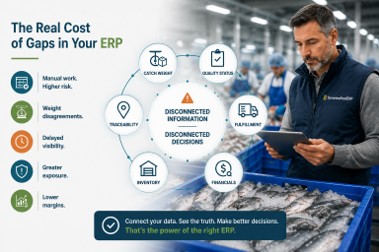
When critical seafood processes sit outside the ERP, the consequences extend beyond manual work. Disconnected catch-weight, inventory, quality, traceability, fulfillment, and financial data can affect decision-making, operational risk, and profitability.
I remember a conversation with a business that initially described several of these as “reporting problems.”
As we walked through the process, the issue wasn’t really reporting.
The ERP knew how many units had moved. Operations knew the actual weights. Quality knew which inventory was restricted. Another team maintained additional information needed for customer requirements.
Everyone could eventually get to an answer.
The problem was that getting there required people to assemble the business reality after the transactions had already happened.
That’s an expensive way to create visibility.
Not necessarily because of software cost, but because of time, reconciliation, delayed decisions, and the risk that different people act on different information.
Once you’ve identified a gap, the next question is how to solve it.
There are three broad approaches.
Configuration
Configuration uses capabilities already available within the platform and adapts them to your processes.
When configuration can cleanly satisfy the requirement, it is often attractive because it keeps you closer to the standard platform.
Customization
Customization creates functionality specifically for your organization.
There are situations where this makes sense, particularly when a process genuinely differentiates the business.
But executives should understand what they’re committing to.
Who maintains it?
How will upgrades affect it?
What happens if the original developer is no longer involved?
Will future integrations have to account for it?
Purpose-Built Industry Extensions
A purpose-built extension addresses requirements shared by a particular industry rather than creating the same solution independently for every customer.
This is the approach behind DynamicsFoodERP.
Microsoft Dynamics 365 Business Central provides the ERP platform, while DynamicsFoodERP adds food-industry capabilities around areas such as catch-weight, advanced lot management, scanning, EDI, and connected operational workflows. That platform-plus-industry approach is also the model established in the pillar article.
There is an important distinction here.
Industry-specific ERP does not necessarily mean replacing a modern general ERP platform with an isolated niche system.
It can mean extending a broadly supported platform so that it understands the operational requirements of the industry.
For executives, that can provide a useful balance between industry fit and platform longevity.
Even excellent software can be implemented badly.
And a capable implementation partner who doesn’t understand seafood may ask perfectly reasonable questions that lead to the wrong design.
This is where industry experience becomes valuable.
I remember sitting in process discussions where a seemingly innocent question about units of measure opened an entire conversation about purchasing weight, warehouse quantity, processing consumption, customer pricing, and invoicing.
To someone unfamiliar with catch-weight, those can appear to be separate requirements.
To someone who understands food and seafood operations, they are connected.
That affects discovery.
It affects solution design.
It affects testing.
And it affects whether employees recognize the new ERP as a system that understands their jobs.
It’s crucial for buyers to evaluate a partner’s experience with seafood manufacturing ERPs, process discovery, data migration, integration design, testing, training, and long-term support when selecting an implementation partner.
I suggest asking prospective partners to demonstrate their ability to handle your difficult transactions.
Don’t just ask:
“Do you support catch-weight?”
Ask them to show you how a catch-weight item is purchased, received, moved, processed, allocated, sold, and invoiced.
Don’t just ask:
“Do you support traceability?”
Give them a transformed product and ask them to trace it backward to the supplier and forward to the customer.
A good demonstration should feel less like a sales presentation and more like a working session.
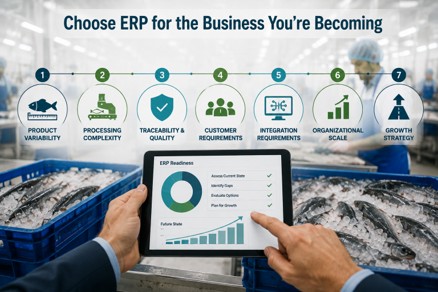
If you’re deciding between a standard ERP implementation and one with seafood-specific functionality, I recommend assessing seven areas.
1. Product Variability
Are units consistent, or does actual weight vary materially?
The greater the variability, the more important it becomes for the ERP to maintain both units and weight accurately.
2. Processing Complexity
Do you simply buy and sell product, or do you cut, trim, grade, freeze, repack, assemble, or otherwise transform it?
More transformation means greater requirements around yield, cost, lot genealogy, and inventory accuracy.
3. Traceability and Quality Exposure
How quickly can you identify the origin, current location, status, transformation history, and customers associated with a lot?
For seafood importers, traceability requirements can extend beyond internal operational needs. NOAA Fisheries’ Seafood Import Monitoring Program, for example, establishes reporting and recordkeeping requirements for covered seafood imports from the point of harvest through entry into U.S. commerce.
4. Customer Requirements
Do customers have specific requirements regarding shelf life, lot numbers, labeling, weights, EDI, or fulfillment?
5. Integration Requirements
Consider scales, scanners, warehouse devices, EDI, customer systems, reporting tools, and other operational applications.
6. Organizational Scale
How many facilities, warehouses, product lines, customers, and transactions are you supporting?
A workaround that is manageable at one location can become a significant control problem across five.
7. Growth Strategy
This is the one executives sometimes overlook.
Don’t evaluate only the business you have today.
Think about acquisitions, new facilities, new customers, additional processing, increased transaction volume, and changing reporting requirements.
Taken together, these seven factors provide a practical way to evaluate whether standard ERP functionality is sufficient or whether seafood-specific capabilities should become part of your long-term ERP foundation.
As I said in the first article in this series:
“Don’t buy ERP for the business you were five years ago. Evaluate it for the business you’re trying to become.”
That principle matters even more when deciding which capabilities should be part of your ERP foundation.
Choosing between general ERP capabilities and seafood-specific functionality is ultimately about deciding what information needs to remain connected as product moves through your business.
That leads directly to the next article in this series:
“How Seafood ERP Software Improves Supply Chain Visibility and Inventory Control.”
We’ll move from ERP selection into day-to-day operations and look at how connected information can improve purchasing, catch-weight receiving, inventory availability, processing and yield, shelf life, warehousing, fulfillment, landed cost, and margin visibility.
The brief identifies that article as the operational business case for seafood ERP, following the product from receipt through processing, storage, sale, and delivery.
Ultimately, selecting the right ERP is only the beginning.
The value comes from what your people can do with the information once the system is running.
The decision between a general ERP and seafood-specific functionality doesn’t need to begin with a software demonstration.
Start with your exceptions.
Where do spreadsheets take over?
Where does actual weight stop matching inventory quantity?
Where does quality information live?
Which transactions require rekeying?
How long does it take to reconstruct traceability?
Where does finance have to reconcile operational information before it can trust the numbers?
Those gaps will tell you far more about your ERP requirements than a generic feature checklist.
At DynamicsFoodERP, we combine Microsoft Dynamics 365 Business Central with functionality tailored to the operational requirements of food businesses, including catch-weight, advanced lot management, scanning, EDI, and integrated operational and financial processes.
If you’re evaluating ERP, we can help you identify where standard functionality fits, where seafood-specific requirements matter, and what should be demonstrated before you make a decision.
Can standard Business Central support a seafood company?
Yes. Business Central can provide the core ERP foundation for financial management, purchasing, sales, inventory, and other business processes. The important question is whether a seafood company’s specific operational requirements can be handled through standard functionality, configuration, integrations, or industry-focused extensions.
What is the difference between general ERP and seafood-specific ERP?
General ERP typically addresses common business processes such as finance, purchasing, sales, inventory, and reporting. Seafood-specific ERP functionality addresses additional requirements such as catch-weight, dual units, actual-weight inventory, shelf life, quality status, product transformation, yield, and enhanced lot traceability.
Does seafood-specific ERP require a completely separate platform?
Not necessarily. DynamicsFoodERP, for example, uses Microsoft Dynamics 365 Business Central as the ERP foundation and adds food-industry functionality. This allows organizations to combine a modern ERP platform with capabilities designed for industry-specific workflows.
Does every seafood processor need catch-weight ERP?
No. The requirement depends on how products are purchased, inventoried, processed, sold, and invoiced. Businesses handling variable-weight products may benefit significantly from catch-weight functionality, while businesses dealing primarily with fixed-weight products may have simpler requirements.
Does seafood ERP require extensive customization?
It shouldn’t automatically require extensive customization. Requirements may be satisfied through standard functionality, configuration, integrations, or purpose-built extensions. Customization should be considered when there is a genuine business requirement that cannot be addressed appropriately through those approaches.
What should a seafood company ask to see during an ERP demonstration?
Ask the provider to demonstrate your real workflows. That may include receiving variable-weight inventory, tracking actual weight and units, placing a lot on quality hold, transforming supplier lots into output lots, tracing product from supplier to customer, integrating warehouse scanning, and showing how those transactions affect financial reporting.
How do we know when standard ERP is no longer enough?
Common warning signs include spreadsheets supporting critical processes, separate weight reconciliation, quality controls outside the ERP, difficult yield analysis, slow traceability investigations, duplicate data entry, and different departments relying on different versions of operational information.
What matters more, the ERP platform or the implementation partner?
Both matter. A capable platform without the right industry functionality may create gaps, while good software implemented without sufficient process understanding can produce poor workflows. Buyers should evaluate the platform, seafood functionality, integrations, implementation methodology, and partner expertise together.
Andrew Good is the founder of DynamicsFoodERP and a trusted advisor to food manufacturers and distributors seeking to improve operations through technology. With more than two decades of experience in manufacturing, operations, and ERP systems, Andrew helps food businesses strengthen traceability, improve inventory visibility, support compliance initiatives, and build scalable foundations for growth.
Before specializing in Microsoft Dynamics solutions, Andrew held engineering, maintenance, and operational leadership roles with global organizations including Unilever and Sony Music. His hands-on experience on the plant floor, combined with more than 14 years of working with Microsoft Dynamics NAV and Dynamics 365 Business Central, gives him a practical understanding of the challenges food manufacturers face every day.
Andrew works closely with companies across dairy, seafood, meat and poultry, and food distribution, helping them modernize ERP systems, streamline processes, improve food safety and compliance, and gain greater visibility across production and supply chain operations.