Warehouse management in food manufacturing involves more than just tracking stock. It requires precise control over perishable inventory, lot tracking for compliance, and efficient movement of goods across multiple locations. Without the right systems, manufacturers face spoilage, delays, and regulatory risk.
At DynamicsFoodERP, we work with food manufacturers who are trying to bring more structure to their inventory management. Many of them are already using Microsoft Dynamics 365 Business Central, but haven’t fully tapped into its Warehouse Management System (WMS) capabilities. That’s where the real transformation happens.
Why Warehouse Management Is So Complex in Food Manufacturing
Warehouse management in food manufacturing refers to the processes used to store, track, and move food products efficiently and safely. It includes: monitoring expiry dates, tracking lot and serial numbers, managing temperature zones, coordinating picking and put-away, and ensuring regulatory compliance.
Common Inventory Challenges in Food Manufacturing
- Perishable Inventory Control
Food products often have short shelf lives. Without automated expiry tracking, manufacturers risk spoilage and waste. Business Central supports FEFO (First Expired, First Out) picking to ensure older stock is used first.
- Lot Tracking and Compliance
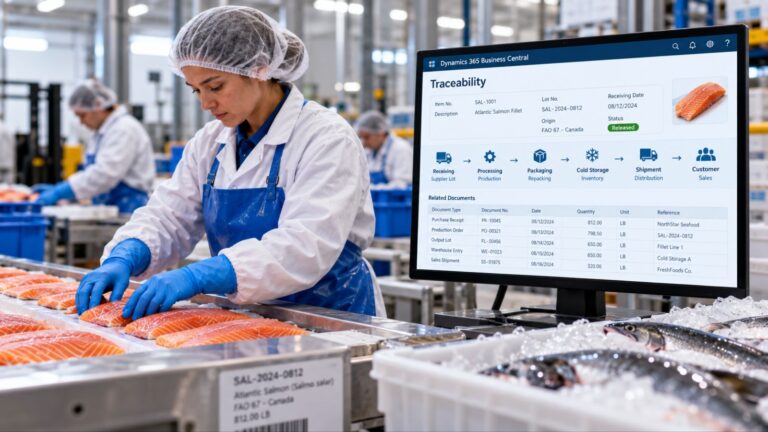
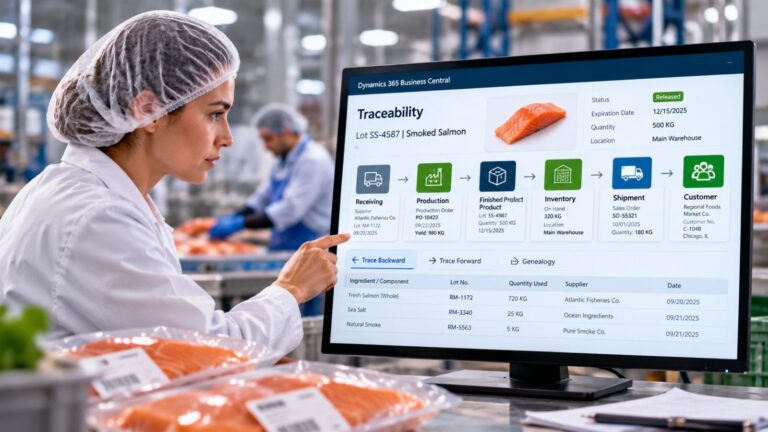
Lot tracking is essential for food safety. Business Central enables full traceability from receiving to shipping, helping manufacturers meet regulatory standards and respond quickly to recalls.
- Inefficient Warehouse Layouts
Poorly organized warehouses slow down picking and put-away. Business Central allows for rule-based storage and picking strategies that improve speed and accuracy.
- Limited Inventory Visibility
Many manufacturers operate across multiple facilities. Business Central provides real-time visibility into inventory across all locations, helping teams make informed decisions.
- Manual Processes and Errors
Paper-based systems and spreadsheets are prone to mistakes. Business Central integrates mobile devices and barcode scanning to automate tasks and reduce errors.
What Business Central WMS Offers Food Manufacturers
Business Central’s WMS features are designed to address these challenges directly. Here’s how it helps food manufacturers gain control over their warehouse operations:
Real-Time Inventory Visibility
Inventory levels are updated instantly across all locations. This allows warehouse managers to make informed decisions about replenishment, picking, and shipping. It also supports better coordination with production and sales teams.
Automated Lot and Serial Tracking
Lot tracking is built into Business Central, making it easier to maintain traceability and meet compliance requirements. Manufacturers can trace ingredients and finished goods through every stage of the supply chain, and quickly isolate affected lots if needed.
Expiry-Based Picking Strategies
Business Central supports FEFO (First Expired, First Out) picking, which helps reduce spoilage and ensures that older inventory is used before newer stock. This is especially important for products with short shelf lives or strict freshness standards.
Mobile and Barcode Integration
Warehouse staff can use mobile devices and barcode scanners to perform tasks like receiving, picking, and inventory counts. This reduces manual entry errors and speeds up operations, while keeping records accurate and up to date.
Configurable Workflows
Business Central can be tailored to match the specific needs of each manufacturer. Whether dealing with bulk ingredients, packaged goods, or temperature-sensitive items, workflows can be configured to support the right processes and storage rules.
Scalable Architecture
As operations grow, Business Central scales with them. Whether adding new product lines, expanding facilities, or increasing throughput, the system can support more complex inventory environments without losing performance or visibility.
Best Practices for Implementing Business Central WMS
To get the most out of Business Central’s WMS features, manufacturers should:
- Define clear rules for lot tracking and expiry management
- Map warehouse zones based on product types and storage conditions
- Set up automated alerts for low stock, approaching expiry, or lot issues
- Train staff on mobile workflows and barcode scanning
- Integrate WMS data with production planning and forecasting tools
These steps help ensure that the system supports day-to-day operations while also providing the data needed for strategic planning.
Warehouse management in food manufacturing doesn’t have to be chaotic. With the right tools and configuration, manufacturers can gain visibility, reduce waste, and improve compliance. Microsoft Dynamics 365 Business Central provides the foundation for a more efficient and reliable warehouse operation, one that supports growth and adapts to the demands of the food industry.
Why DynamicsFoodERP?
DynamicsFoodERP is built specifically for food and beverage manufacturers. It goes beyond standard ERP functionality by addressing the operational realities of managing perishable inventory, lot tracking, and warehouse workflows in regulated environments.
Additionally our suite of purpose-built Business Central apps are designed to extend core capabilities for food operations. These enhancements include tools for:
- Advanced lot management and expiry tracking
- Catch weight and variable weight handling
- Quality control and compliance workflows
- Production scheduling tailored to food processing
- Integrated labeling and traceability features
These apps are developed with input from industry experts and are designed to work seamlessly with Business Central, helping manufacturers reduce manual work, improve accuracy, and stay audit-ready.
If your current ERP setup feels too generic or disconnected from how your warehouse actually runs, DynamicsFoodERP offers a more focused, scalable solution.
Ready to simplify your warehouse operations and strengthen inventory control?
Contact us to speak with a food ERP specialist and explore how DynamicsFoodERP and its purpose-built apps can support your business.
FAQ: Warehouse Management in Food Manufacturing
What is FEFO picking?
FEFO stands for First Expired, First Out. It ensures that products with the earliest expiry dates are used or shipped first.
How does lot tracking help with recalls?
Lot tracking allows manufacturers to trace affected products quickly, reducing risk and improving response time during recalls.
Can Business Central handle multiple warehouse locations?
Yes. Business Central provides centralized visibility and control across multiple facilities.
Is barcode scanning supported in Business Central WMS?
Yes. Barcode scanning improves accuracy and speeds up warehouse tasks.